Addition Puzzle Math Trainer
Reviews
Description
Game Introduction
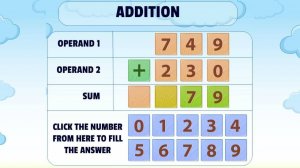
Addition Puzzle Math Trainer is an educational puzzle game that turns traditional math exercises into an engaging digital experience. Designed for learners of all ages, the game focuses on building addition skills through repeated, focused practice. The interface mimics a clean notepad, allowing players to concentrate on numbers without distractions. The core objective is to solve addition problems accurately and efficiently, with options to practice standard addition or problems that require carrying over. This approach transforms essential math practice into a rewarding puzzle experience that helps players build confidence and mental arithmetic abilities over time.
How to Play
Playing Addition Puzzle Math Trainer is straightforward. First, select a game mode: standard addition or addition with carrying over. Next, choose a time limit that fits your schedule, from a relaxed session to a timed challenge. Once the game starts, an addition problem appears on the digital notepad. Use the on-screen number pad or your keyboard to type the correct answer. The game provides immediate feedback, letting you know if you are correct. A new problem generates automatically after each answer. Your goal is to solve as many problems as possible within the time limit, improving your speed and accuracy with each session.
Game Features
Customizable practice modes let you focus on specific skills. The clean, notebook-style interface reduces visual clutter. Family-friendly educational content ensures a safe experience for all ages. Immediate feedback helps you learn from mistakes. Timed and untimed options accommodate different learning paces.
Tips for Success
Practice regularly to build speed and accuracy. Start with standard addition to master the basics before attempting carrying problems. Use the untimed mode to focus on precision, then gradually challenge yourself with shorter time limits. Review any incorrect answers to understand mistakes and improve. Consistent short sessions are more effective than long, infrequent practice.





Player Comments
Sign in to comment
You must be logged in before posting a review or rating.
No account? Create one
No comments yet. Be the first to comment!